Embedded Patterns
~15 min
Mental Model
Embedded Development All Follows a Similar Pattern
Instantiate → Configure → Control
We will adopt this as a Mental Model to navigate the Rust Ecosystem
Peripheral Singletons
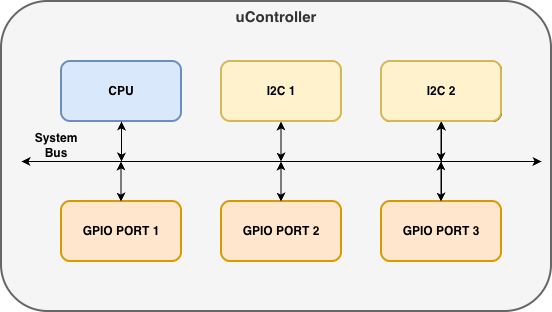
The singleton pattern ensures that only one instance of each peripheral exists in your program. In a microcontroller, there is physically a single block for each peripheral — the software gives us access to only that one instance, not duplicates or copies of it.
At the PAC level, we use Peripherals::take() to claim ownership of all peripherals at once. This can only be called once — calling it again returns None. This guarantees exclusive access.
#![allow(unused)]
fn main() {
let peripherals = Peripherals::take().unwrap();
}
From that single call, we can access individual peripherals (one instance per block). We then use these PAC instances to create HAL-level driver instances, as shown below.
GPIO Instantiation Examples
Although the methods differ between HALs, they are all doing the same thing — taking a peripheral singleton and creating a GPIO output driver instance:
rp2040-hal
#![allow(unused)]
fn main() {
let pac = pac::Peripherals::take()
    .unwrap();
let sio = Sio::new(pac.SIO);
let pins = Pins::new(
    pac.IO_BANK0,
    pac.PADS_BANK0,
    sio.gpio_bank0,
    &mut pac.RESETS,
);
let led = pins.gpio25
    .into_push_pull_output();
}
esp-hal
#![allow(unused)]
fn main() {
let peripherals = esp_hal::init(
    Config::default()
);
let led = Output::new(
    peripherals.GPIO0,
    Level::High,
    OutputConfig::default(),
);
}
stm32f4xx-hal
#![allow(unused)]
fn main() {
let pac = Peripherals::take()
    .unwrap();
let gpioa = pac.GPIOA.split();
let led = gpioa.pa5
    .into_push_pull_output();
}
Configure
Once we have an instance, it gives us methods to configure it. Again, although the API style varies across HALs, they are all configuring a GPIO input with a pull-up resistor:
rp2040-hal
#![allow(unused)]
fn main() {
let button = pins.gpio15
    .into_pull_up_input();
}
esp-hal
#![allow(unused)]
fn main() {
let button = Input::new(
    peripherals.GPIO9,
    InputConfig::default()
        .with_pull(Pull::Up),
);
}
stm32f4xx-hal
#![allow(unused)]
fn main() {
let button = gpioa.pa0
    .into_pull_up_input();
}
Control
And finally, the instance provides methods to control the peripheral. All three HALs are checking if a button is pressed and setting an LED high — the syntax is nearly identical:
rp2040-hal
#![allow(unused)]
fn main() {
if button.is_high().unwrap() {
    led.set_high().unwrap();
}
}
esp-hal
#![allow(unused)]
fn main() {
if button.is_high() {
    led.set_high();
}
}
stm32f4xx-hal
#![allow(unused)]
fn main() {
if button.is_high() {
    led.set_high();
}
}
Things to Note
-
HAL Peripheral instances are drivers for microcontroller peripheral blocks
-
Off-controller device drivers (e.g. an I2C sensor) are a similar concept. They are instances that use microcontroller peripheral drivers to provide abstraction. Same concept as how peripherals use the PAC.
-
Configuration is sometimes passed as an argument to the instantiation statement rather than as a separate step
-
HALs often implement embedded-hal traits to provide device drivers with a common interface across controllers